Bulk email over MCP: one tool call instead of 200
Why an AI agent should send campaigns with one massive_send call (a template, variables and a recipient list) instead of calling send_message once per person: fewer tokens, fewer mistakes, and replies that come back to the inbox.
Give an AI agent an inbox and sooner or later someone asks it to write to a lot of people at once: the payment reminder for everyone who’s overdue, the welcome email for this week’s new customers, the invitation to a workshop. The agent can do it two ways. It can call send_message once per person, or it can call massive_send once with a template, the variables and the list.
The result in the recipients’ inboxes looks the same. What happens in between is very different.
Two ways to send 200 emails
With send_message, the agent writes every email itself. For 200 customers that’s 200 tool calls, and each one carries the full subject and body for that person and gets a result back. In a tool-using agent each call is also its own round trip: the model writes the call, the client runs it, the result goes back into the conversation, and the model reads everything again before writing the next one. Anthropic’s documentation lists the tool_use and tool_result blocks among the tokens you pay for, and the MCP specification describes the same request and response for every tools/call.
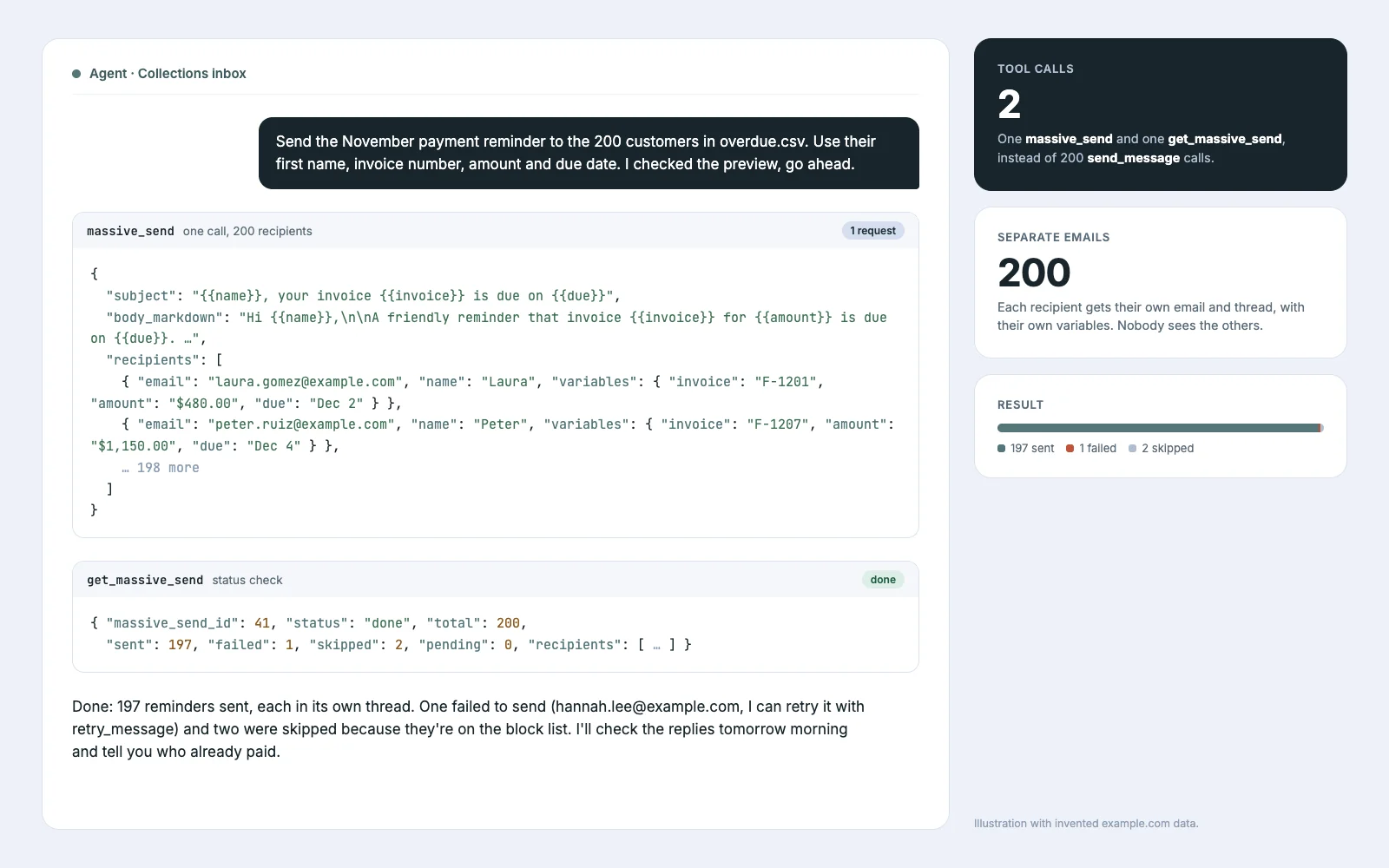
With massive_send, the agent writes the email once, with placeholders, and passes the list:
{
  "subject": "{{name}}, your invoice {{invoice}} is due on {{due}}",
  "body_markdown": "Hi {{name}},\n\nA friendly reminder that invoice {{invoice}} for {{amount}} is due on {{due}}. If you've already paid, ignore this email. Questions? Just reply.",
  "recipients": [
    { "email": "laura.gomez@example.com", "name": "Laura", "variables": { "invoice": "F-1201", "amount": "$480.00", "due": "Dec 2" } },
    { "email": "peter.ruiz@example.com", "name": "Peter", "variables": { "invoice": "F-1207", "amount": "$1,150.00", "due": "Dec 4" } }
  ]
}
The tool returns a massive_send_id right away and mailforagents sends in the background, one separate email per person, each in its own thread. Later, get_massive_send with that id reports how many were sent, failed, skipped or are still pending.
How many tokens does that save?
This is an estimate, not a measurement, and it depends on the model, the client and how long the email is. Here’s the calculation, using OpenAI’s rule of thumb of about 4 characters per token:
- One
send_messagecall for a 65-word reminder, as JSON with the address and subject, is about 520 characters: ~130 tokens the model has to write. The result (thread_id,message_id, status) is ~40 tokens. So each recipient adds about 170 tokens to the conversation, or ~34,000 for 200 people. - One
massive_sendcall with the same template and 200 recipients (address, name and three variables each) is about 27,000 characters: ~6,800 tokens. The status check returns every recipient’s status, about ~5,600 tokens for 200. Together, ~12,500 tokens.
That’s roughly a third of the tokens in the conversation. The bigger difference is in what the model reads. Say the conversation starts at 10,000 tokens (instructions, tool definitions and the customer table). One call per person means 200 turns over a context that grows from 10,000 to 44,000 tokens: about 5.4 million input tokens processed in total. The bulk version takes three turns and about 50,000. Prompt caching makes repeated input cheaper (cache reads cost a tenth of the base price on most Claude models) and some clients run several calls per turn, but the model still writes all 200 emails, and you wait for all 200 round trips.
Why it’s also more reliable
The template is written once and you can review it once. With 200 separate calls, the model is writing email #87 deep into a long context, and long contexts are where models get sloppy: research like “Lost in the Middle” shows they use information in the middle of long inputs less reliably. That’s when a name lands on the wrong invoice, the tone drifts, or the agent stops at 143 because it hit a limit and says it’s done.
With massive_send the server does the repetitive part. It swaps {{name}}, {{email}} and any variable you pass into each copy (in Spanish, {{nombre}} works too), removes duplicate addresses, skips anyone on the inbox’s block list or previously suppressed for bounces or complaints, and paces delivery. If the list doesn’t fit in what the inbox can still send today, the whole send is rejected up front instead of stopping halfway.
What companies use it for
- Payment reminders with the amount, invoice number and due date per customer.
- Onboarding and welcome emails for everyone who signed up this week, with their plan and first steps.
- Event invitations to a list, with the date, place and a reply-to-confirm.
- Product updates about a change that affects some customers, with what changes for each.
- Re-engagement for customers who haven’t ordered in months, with their last purchase.
- Internal announcements to the team: a policy change, the holiday schedule, a form to fill.
Lists, progress and replies
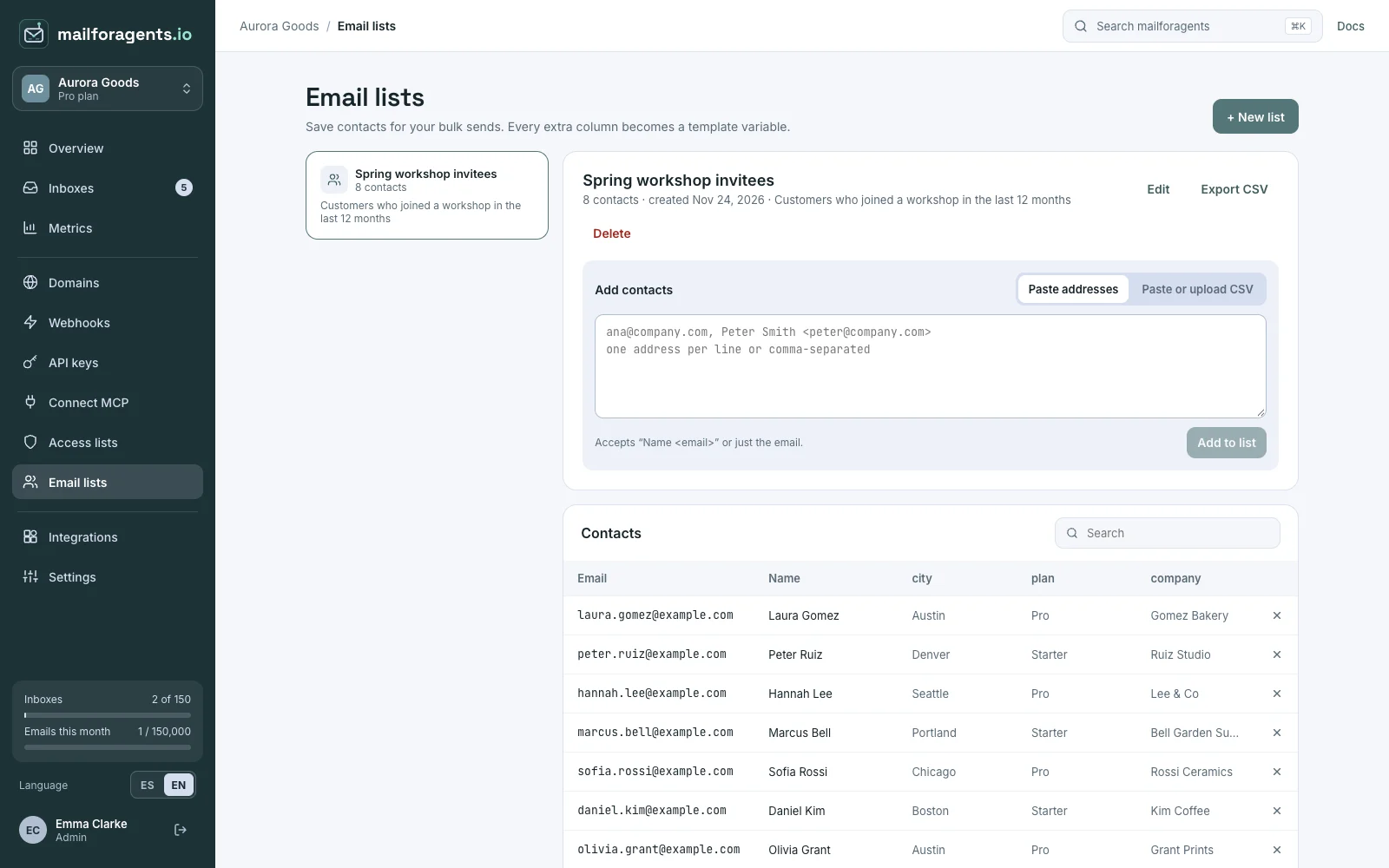
Lists you reuse live under Email lists in the dashboard: paste addresses or upload a CSV, and every extra column becomes a variable. From the dashboard you can send to a saved list directly. Over MCP the agent passes the recipients itself, usually from a table or CSV you give it.
Because every email goes out in its own thread from a real inbox, replies come back separately. That’s where the agent earns its keep after the send:
Check the replies to yesterday's payment reminder (massive send 41).
List who already paid, who is asking for more time and who asked not to get these emails.
Draft replies for the ones asking for time; don't send anything yet.
Retry the one that failed if the address looks right.
The agent reads threads with list_messages and get_thread, writes drafts with create_draft, and retries a failed email with retry_message.
Guardrails
- Approve before the call. Ask the agent to show you the first email rendered with real data and the number of recipients, then confirm. Keep your client’s confirmation for actions that send; the MCP specification says clients should ask before sensitive operations. In the dashboard, Send me a test delivers one sample to your own address.
- Limits. Bulk sending isn’t on the Free plan; it starts on Starter (10,000 emails a month) and Pro (150,000). Each inbox has a daily sending limit, 500 by default, which you can change in its settings, and a single send can have up to 5,000 recipients.
- Only people who expect it. Use it for customers, users and teammates who have a relationship with you, not for cold lists. US law (CAN-SPAM) requires a working opt-out honored within 10 business days, and Gmail and Yahoo ask bulk senders for authentication, one-click unsubscribe on marketing mail and a spam rate under 0.3%.
- Honor opt-outs. Bulk emails end with a line explaining how to opt out by replying. Have the agent look for those replies and remove the people from your list.
Start with something everyone expects, like a payment reminder, and let the agent handle the replies.
Sources
- Tool use with Claude: pricing, Anthropic
- Prompt caching, Anthropic
- What are tokens and how to count them, OpenAI Help Center
- Tools, Model Context Protocol specification
- Lost in the Middle: How Language Models Use Long Contexts, Liu et al.
- CAN-SPAM Act: A Compliance Guide for Business, FTC
- Email sender guidelines, Google
- Sender best practices, Yahoo